
District Calendar Addresses
- Now Playing in Nebo (+ Google Calendar)
- Nebo School District Base Calendar (+ Google Calendar)
- A/B Days (+ Google Calendar)
- US Holidays (+ Google Calendar)
Other Employee Calendars
Printable Calendars
- 2023-2024 Calendar (Revised 5/10/2023) (View only*)
- 2023-2024 Calendar (with A/B days)
- 2024-2025 Calendar (Board Approved) (View only*)
- 2025-2026 Calendar (Tentative) (View only*)
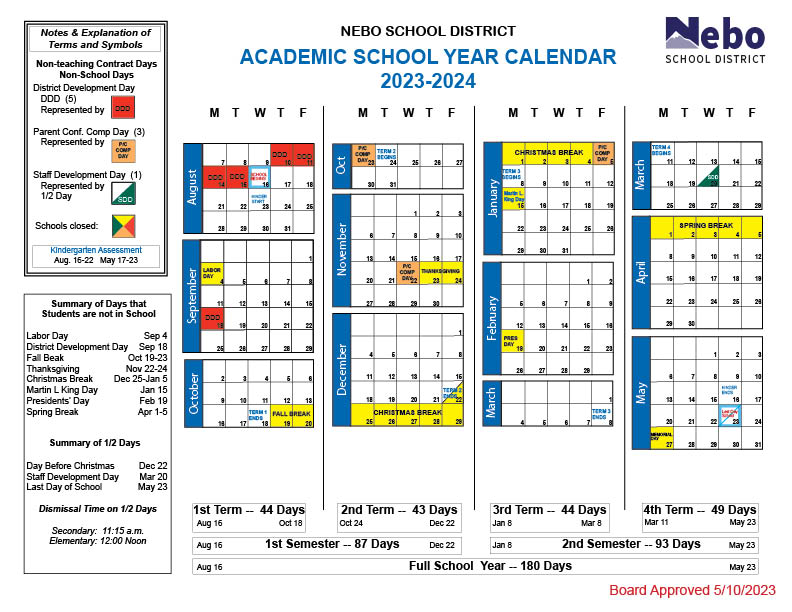
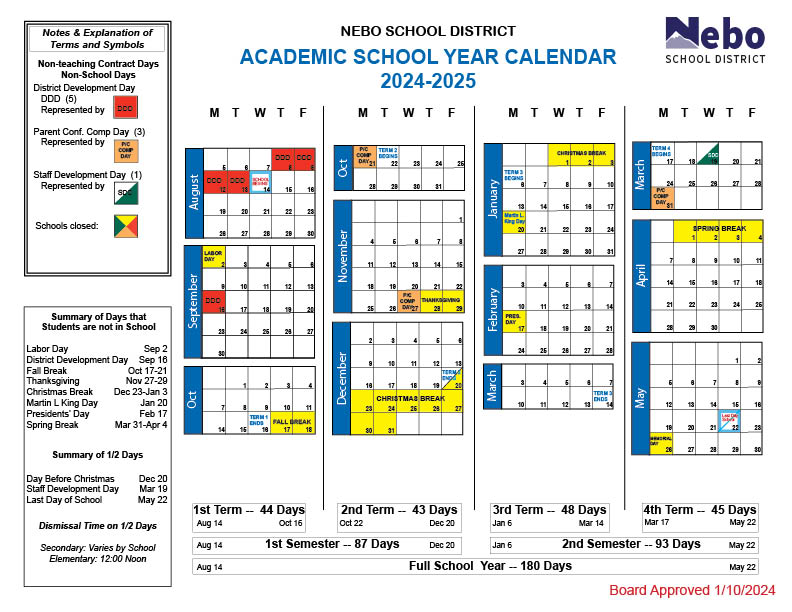
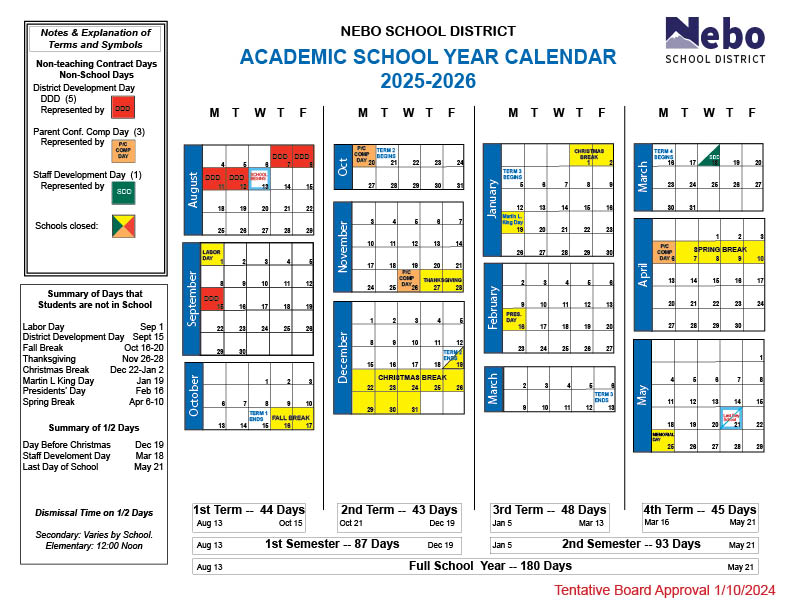
* The pdf viewer of some browsers have trouble displaying all the calendar info. The View only option provides an image to view in browser. For printed copies download the pdf first before printing it.
Graduation Dates
- Landmark - Monday, May 20, 2024 at 11 am at the Spanish Fork Fairgrounds
- NOLS - Monday, May 20, 2024 at 3 pm at SHHS Auditorium
- MMHS - Tuesday, May 21, 2024 at 10 am at UVU Events Center
- PHS - Tuesday, May 21, 2024 at 2 pm at UVU Events Center
- SHHS - Tuesday, May 21, 2024 at 6 pm at UVU Events Center
- SFHS - Wednesday, May 22, 2024 at 10 am at UVU Events Center
- SHS - Wednesday, May 22, 2024 at 2 pm at UVU Events Center
Historical Calendars
2001-02, 2002-03, 2003-04, 2004-05, 2005-06, 2006-07, 2007-08, 2008-09, 2009-10, 2010-11, 2011-12, 2012-13, 2013-14, 2014-15, 2015-16, 2016-17, 2017-18, 2018-19, 2019-20, 2020-21, 2021-22, 2022-23, 2023-24
How To Subscribe to a Calendar
To subscribe to a calendar:
- From any Google Calendar page (You may need to Follow the link to a particular calendar).
- Click the
 (Google Subscribe button) found in the bottom right corner of the calendar.
 - If more than one calendar was displayed on the page, you will be given the option of which calendars to subscribe to.
- The calendar will be added to your Google Account Calendars page.